Today, we're looking at sidechain.

Say it, put the lesson on the board and press Start. It teaches one idea on a drawing of the device: the pen draws and labels, the sound plays, the class answers before anything is shown, and then every student takes the controls.

Or set it for homework. Each lesson takes about 15 to 25 minutes.

Sidechain, step 1. Start pressed: the parts it is about lit, the rest in grey, the pen writing beside them

How a lesson runs.

  1. Watch
  2. Try
  3. Make
  4. Explain

Every lesson has the same four parts, so a class knows where it is. Here is the sidechain lesson, step by step, as your students see it.

01Watch

The lesson shows it

The pen draws on the device and writes the labels where they belong. The part being taught is lit, and everything else goes grey, so the eye has one place to go.

Every few steps it stops and asks. The class picks an answer before the pen moves anything, then hears and sees whether they were right.

Where a student wouldn't know where to look, the picture closes in on the part, then pulls back so they see where it sits. This is the synth essay, being built now.
Minutes
Close to half the lesson
On the board
Do this part together: the class calls the answer, one student taps it
02Try

Every student does it, one move at a time

Now the controls are theirs, with the moves laid out: first what the lesson does, then what they do. Each move plays the sound, and the lesson answers the way you would from beside their desk.

  1. lower: the kick never crosses it
  2. lower Threshold: even 20:1 only ducks it 1.4 dB
  3. more Ratio: it only ducks 9.9 dB
  4. room for the kick ✓

What it said to one student, one go at a time. After three goes that change nothing, Show me appears.

03Make

Every student does it alone

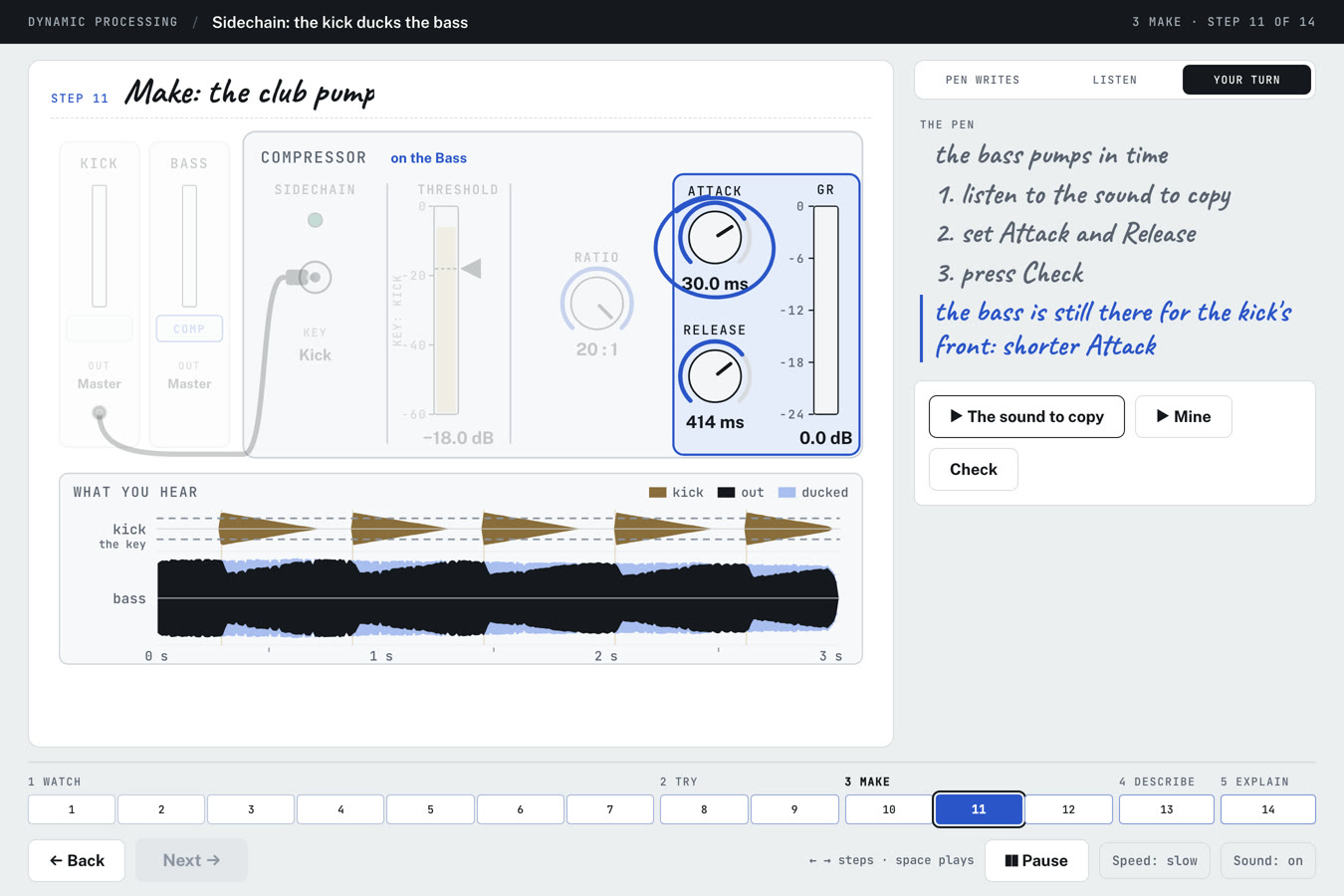
A sound to copy, and no moves to follow. They play the sound, play theirs, and press Check. Check names the first control that's off and which way to turn it.

Three Makes a lesson, each a sound they would hear in a real mix. In the sidechain lesson: a light duck, the club pump, and the swell.

  1. the bass is still there for the kick's front: shorter Attack
04Explain

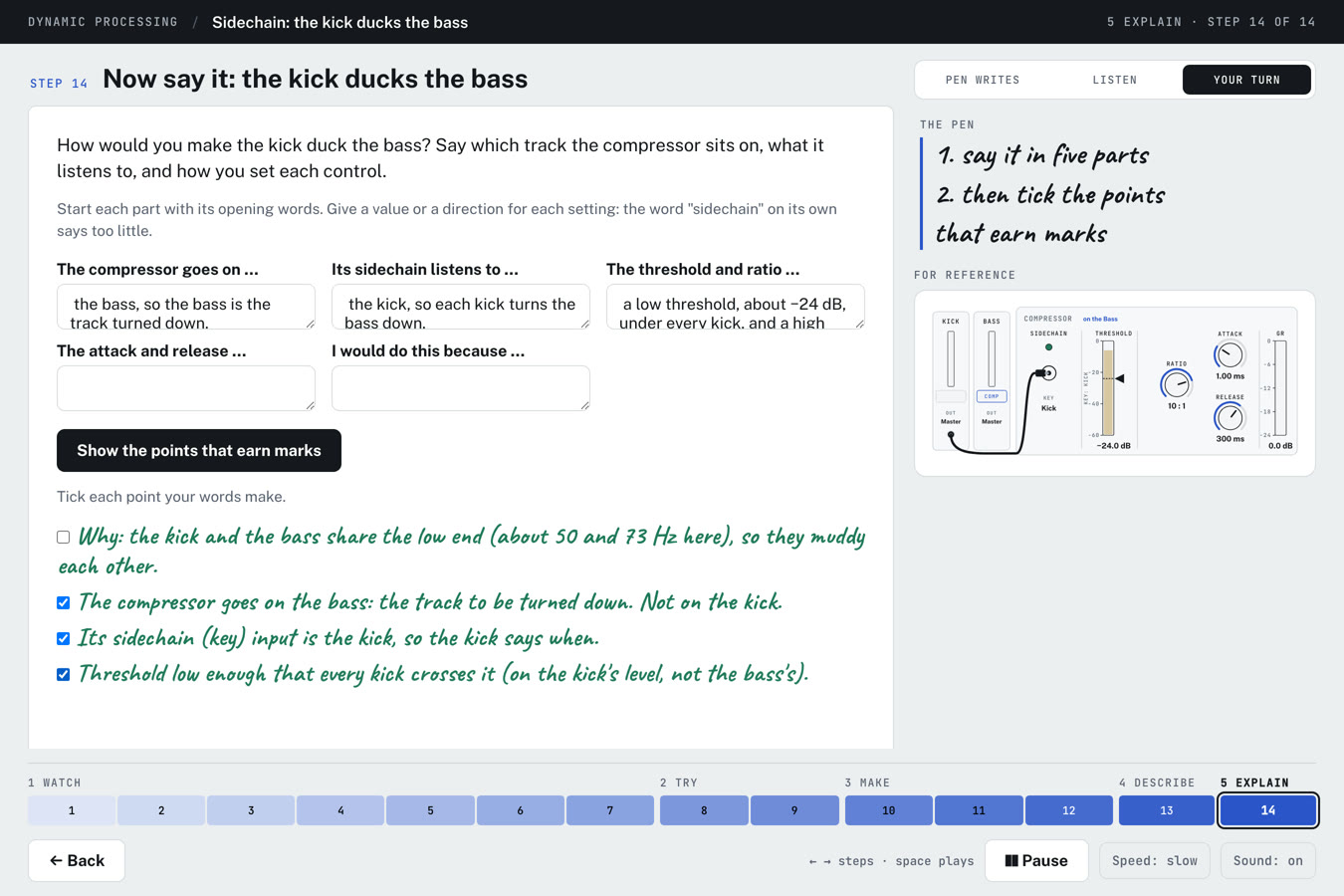
Every student writes it as the paper asks

The last step is the written answer. Sentence openings to start from, and a value or a direction for every setting, because a word on its own earns too little.

Then the points that earn marks appear, and the student ticks the ones their own words make. The page never marks the writing for them.

Some lessons add a Describe step before it: hear a clip, then name the process and its settings, as the listening paper asks. A card sets the paper's words beside the names Live and other software use.

Why it's built this way.

The lessons are drawn for what a student finds hard on the papers: knowing which control does what, what it sounds like, and saying so in the right words. Each choice below rests on research most teachers will recognise: the idea first, then where it comes from.

Watch, Try, Make, Explain, in that order
The lesson shows it, the student does it with help, then alone, then writes it. The help comes off one step at a time, so no student is asked to do alone what they haven't yet done with support. Modelling, guided practice, then independent practice: Rosenshine, 2012. Fading the worked example: Renkl and Atkinson, 2003.
The pen draws as it explains
The device is drawn and labelled in front of the class while the words and the sound arrive with it, so a student builds the picture and the explanation together. Watching a diagram being drawn teaches more than being handed the finished one. Dual coding: Paivio; Clark and Paivio, 1991. Watching the teacher draw: Fiorella and Mayer, 2016.
One part lit at a time
Everything not being taught sits back in grey, so a student never hunts for the control being talked about, and nothing on the screen competes with it. Signalling and cutting what isn't needed: Mayer, Multimedia Learning. Cognitive load: Sweller, 1988.
Labels on the drawing, sentences beside it
The pen writes a few words on the device itself and the full sentences in the column, so nothing has to be read in two places at once. Split attention: Chandler and Sweller, 1992. Words next to what they name: Mayer.
A guess before the answer
Each question comes before the pen moves anything, so every student has decided before they're told. Even a wrong guess helps: the answer arrives on a question they already care about. The pretesting effect: Richland, Kornell and Kao, 2009.
In close, then back out
Where the eye wouldn't know where to go, the picture closes in on the part, then pulls back to show where it sits on the whole device. The zoom lens of elaboration theory: Reigeluth and Stein, 1983.
The same answer for everyone
Every check is written into the lesson in advance. It answers each student the same way, and nothing they do leaves their computer.
The full references

In your classroom.

Nothing to install. A lesson opens in any browser, on the board or on a student's own laptop.

  1. On the board

    Say what today is about and press Start. Watch together: the class calls each answer and one student taps it. Then Try and Make on their own screens, while you go round.

  2. For homework

    Send the link. The steps open as each student reaches them, and the page keeps their place on their own computer, so they can stop and carry on later.

  3. As a course

    Dynamics is eight lessons in teaching order, from the compressor to Which tool?, a mixed practice: see the course. Synthesis is being written next.

What you see.

The teacher's side comes with the school licence. Here it is as it stands, with a sample class.

Being built now

The class view

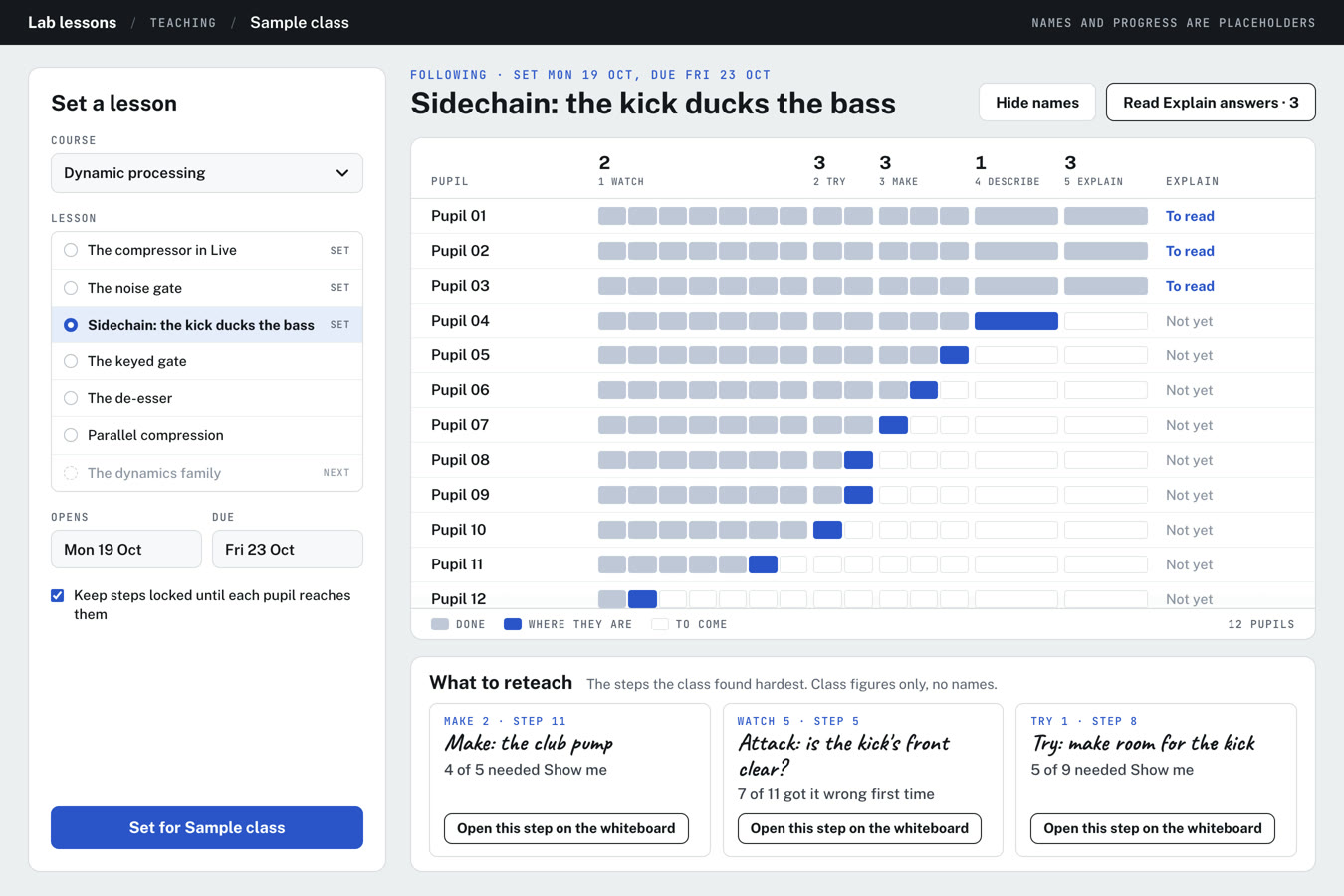
Set a lesson to a class with an opening and a due date. See where each student is up to and whose written answer is ready to read: names and done or not yet, never a score.

Under the class, the two or three steps they found hardest, each with a button that opens that step on the board. Hide names before it goes up.

A note with every lesson

The one idea, the minutes each part takes, where students slip, and which past-paper questions each step prepares them for.

The class view with a sample class of twelve: the sidechain lesson set on Monday and due Friday, a row of steps for each student showing how far they have got, three written answers marked To read, and below it What to reteach, naming three steps the class found hardest

The lessons so far.

Built for my own A level classes, and changed when something doesn't work for them. More are added a topic at a time.

DynamicsA course of eight, in teaching order

  1. The compressorMembers
  2. The noise gateFree
  3. Sidechain: the kick ducks the bassMembers
  4. The keyed gateMembers
  5. The de-esserMembers
  6. Parallel compressionMembers
  7. The dynamics familyMembers
  8. Which tool?Members

SynthesisA course of four, in teaching order

  1. ADSR: the envelopeMembers
  2. OscillatorsMembers
  3. The filterMembers
  4. FMMembers
  5. The synth essay, modelledComing

All four in order on the course page.

Every lesson, topic by topic

Through the erasFor the history questions

  1. Delay through the erasMembers
  2. Reverb through the erasMembers

Try one with your class tomorrow.

The noise gate is free: fourteen steps, about twenty-five minutes, in any browser. If it works for your class, the school licence gives every student the rest.